prremoteでお絵描き
2026-06-23 ruby esp32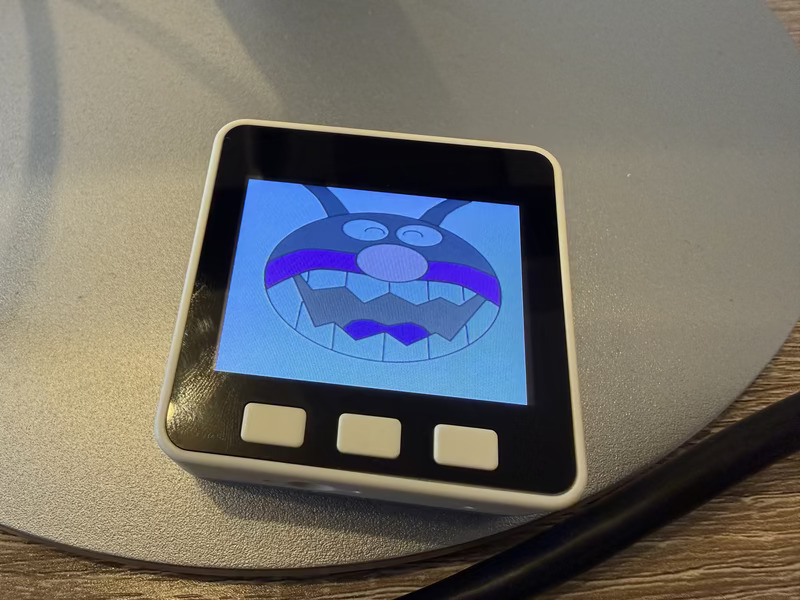
prremote は Raspberry Pi Pico W / M5GO(ESP32)に mruby/c ランタイムを載せ、 PC から Ruby スクリプトを転送して即実行できるツールです。M5GO の 320×240 LCD に絵を描く実験をしたので、アプローチをまとめます。
プリミティブ描画
LCD クラスは fill_rect / fill などの低レベル API を提供しています。
lcd = LCD.new
lcd.fill(LCD.rgb(252, 252, 248))       # 背景を塗りつぶす
lcd.fill_rect(x, y, w, h, LCD::BLACK) # 矩形
fill_circle や fill_ellipse はプラットフォーム側には用意されていないので、
整数平方根(isqrt)を使った走査線ループとして Ruby で実装しています。
def isqrt(n)
  return 0 if n <= 0
  x = n
  nx = (x + 1) / 2
  while nx < x
    x = nx
    nx = (x + n / x) / 2
  end
  x
end

def fill_circle(lcd, cx, cy, r, color)
  dy = -r
  while dy <= r
    dx = isqrt(r * r - dy * dy)
    lcd.fill_rect(cx - dx, cy + dy, dx * 2 + 1, 1, color)
    dy += 1
  end
end
弧(楕円弧・円弧)も同様に自前実装。傾きが 1 を超える急峻な部分は y-scan に切り替えるなど、 ギャップが出ないよう工夫しています。これらの関数を組み合わせると、 座標とパラメータだけで顔のようなイラストを描けます。
画像表示: img2rle
「任意の写真や絵をそのまま表示したい」という場合は、
PC 側で画像を変換するツール samples/tools/img2rle.rb を使います。
ruby samples/tools/img2rle.rb photo.jpg samples/esp32/photo_rle.rb
内部では ImageMagick で画像を 320×240 にリサイズして RGB888(生バイト列)に展開し、
RGB565 に変換したあと行単位で RLE エンコードします。
出力は .rb ファイルで、Ruby の定数としてそのままデバイスに送れます。
# デバイスに転送して実行
prremote run samples/esp32/photo_rle.rb samples/esp32/viewer.rb
prremote run は複数ファイルを順番に送信するので、
「データだけのファイル」と「描画ロジックのファイル」を分離できます。
RLE のデータ形式
生成されたファイルには、パックドバイナリ文字列の定数が一つ定義されています。
$PHOTO_RLE = "\xff\xff\x00\x3d\xf7\xbe\x00\x01..." \
  "\x73\xae\x00\x01\x29\x65\x00\x01..."
4 バイトが 1 セグメントです。
| バイト | 内容 |
|---|---|
| 0–1 | RGB565 カラー(ビッグエンディアン) |
| 2–3 | ピクセル数(ビッグエンディアン) |
行をまたぐランは行末でフラッシュするため、各セグメントは常に 1 行内に収まります。
これにより fill_rect(x, y, count, 1, color) で直接描画できます。
ツールはセグメント数と圧縮率をコンソールに表示します。
RLE: 11359 segments, 6.8x compression → 45436 bytes packed
典型的なアニメ調の画像(広い単色領域が多い)だと 5〜10× 程度の圧縮になります。
デバイス側のデコード
mruby/c 上では String#getbyte でバイナリ文字列を走査し、fill_rect で描画します。
def draw_image(lcd, data)
  n = data.size
  x = 0
  y = 0
  i = 0
  while i < n
    color = (data.getbyte(i) << 8) | data.getbyte(i + 1)
    count = (data.getbyte(i + 2) << 8) | data.getbyte(i + 3)
    lcd.fill_rect(x, y, count, 1, color)
    x += count
    if x >= LCD::WIDTH
      x = 0
      y += 1
    end
    i += 4
  end
end
ソースコード全体と所感
以下が実際のコードです。掲載用にちょっと弄ったので、そのままコピー&ペーストしても動かないかもしれません。あくまで参考としてください。Rubyでなんでも書けるようになった嬉しさもある一方、その土台となるCのランタイムや、RLEなど素で扱うのは難しいデータ構造もAI(Claude)がちょいちょいと作ってくれるので、実際にやりたいことがあるなら、(こんなレイヤを挟まずに)最初からAIに書いてもらった方が速いかもしれないな、と感じました。
今回はClaudeのあまりの絵心の無さ(わざとやってますよね?という勢いで原画のテイストを壊してきます)に大爆笑しながら作ったので、いざとなればこちらでハンドルを握れるという意味で、悪くなかったのかもしれません。完全自動でプログラミングされるケースも増えてくるでしょうから、そうした場合にはお呼びでないかもしれませんが、セミオートで楽しく一緒に作るユースケースにはRubyってすごくフィットする言語じゃないかなと思います。
# Device: M5GO / M5Stack Core (ESP32)
# Two-character face viewer:
#   BtnA (GPIO39): FACE_A (default, draw shapes)
#   BtnB (GPIO38): FACE_B (load face_b_rle.rb — see tools/img2rle.rb)
#   BtnC (GPIO37): EXIT

CREAM_BG = LCD.rgb(252, 252, 248)
BREAD_C  = LCD.rgb(220, 185, 90)

def isqrt(n)
  return 0 if n <= 0
  x = n
  nx = (x + 1) / 2
  while nx < x
    x = nx
    nx = (x + n / x) / 2
  end
  x
end

# Filled ellipse (a = horizontal radius, b = vertical radius).
def fill_ellipse(lcd, cx, cy, a, b, color)
  dy = -b
  while dy <= b
    dx = a * isqrt(b * b - dy * dy) / b
    lcd.fill_rect(cx - dx, cy + dy, dx * 2 + 1, 1, color)
    dy += 1
  end
end

def fill_circle(lcd, cx, cy, r, color)
  dy = -r
  while dy <= r
    dx = isqrt(r * r - dy * dy)
    lcd.fill_rect(cx - dx, cy + dy, dx * 2 + 1, 1, color)
    dy += 1
  end
end

# Top arc of an ellipse as a 2px-wide continuous line.
# Switches between two scan directions at the 45-degree point (|slope| = 1):
#   x_trans = a² / sqrt(a²+b²)
#   |x_rel| ≤ x_trans  →  x-scan: 2px-tall vertical segments with gap-filling
#   |x_rel| > x_trans  →  y-scan: 2px-wide horizontal dots (handles steep/near-vertical portions)
def draw_ellipse_arc_top(lcd, cx, cy, a, b, x0, x1, color, thickness: 3)
  x_trans = a * a / isqrt(a * a + b * b)

  # X-scan: central shallow zone (slope ≤ 1)
  xs = x0 - cx < -x_trans ? -x_trans : x0 - cx
  xe = x1 - cx >  x_trans ?  x_trans : x1 - cx
  prev_y = nil
  x = xs
  while x <= xe
    sq = a * a - x * x
    if sq >= 0
      cur_y = cy - b * isqrt(sq) / a
      if prev_y
        yt = cur_y < prev_y ? cur_y : prev_y
        h  = (cur_y > prev_y ? cur_y - prev_y : prev_y - cur_y) + thickness
        lcd.fill_rect(cx + x, yt, thickness, h, color)
      else
        lcd.fill_rect(cx + x, cur_y, thickness, thickness, color)
      end
      prev_y = cur_y
    end
    x += 1
  end

  # Y-scan: outer steep zones (slope > 1)
  sq_t  = a * a - x_trans * x_trans
  y_top = sq_t >= 0 ? cy - b * isqrt(sq_t) / a : cy
  y = y_top
  while y <= cy
    yr = cy - y
    sq = b * b - yr * yr
    if sq >= 0
      xr = a * isqrt(sq) / b
      if xr >= x_trans
        lx = cx - xr
        lcd.fill_rect(lx, y, thickness, thickness, color) if lx >= x0 && lx <= x1
        rx = cx + xr
        lcd.fill_rect(rx, y, thickness, thickness, color) if rx >= x0 && rx <= x1
      end
    end
    y += 1
  end
end

# Bottom arc of a circle (r), clipped to x in [x0, x1]. Drawn as 3x3 blocks.
def draw_arc_bottom(lcd, cx, cy, r, x0, x1, color)
  x = x0 - cx
  lim = x1 - cx
  while x <= lim
    sq = r * r - x * x
    lcd.fill_rect(cx + x, cy + isqrt(sq), 3, 3, color) if sq >= 0
    x += 1
  end
end

# Rectangle with black borders on left / right / bottom; top is intentionally open.
def draw_open_top_rect(lcd, x, y_top, w, h, fill_color)
  lcd.fill_rect(x,         y_top + h - w, w, w, fill_color)       # fill first
  lcd.fill_rect(x,         y_top, 3, h, LCD::BLACK)        # left border
  lcd.fill_rect(x + w - 3, y_top, 3, h, LCD::BLACK)        # right border
  lcd.fill_rect(x, y_top + h - 3, w, 3, LCD::BLACK)        # bottom border
end

def draw_face_a(lcd)
  lcd.fill(CREAM_BG)

  # Eyebrows: 2px-wide ellipse arc (a=42 b=53, peak y=22, tails y=75)
  draw_ellipse_arc_top(lcd, 107, 75, 42, 53,  65, 149, LCD::BLACK)
  draw_ellipse_arc_top(lcd, 213, 75, 42, 53, 171, 255, LCD::BLACK)

  # Eyes: vertical ellipse (20 wide x 26 tall), no shine
  fill_ellipse(lcd, 107, 95, 10, 13, LCD::BLACK)
  fill_ellipse(lcd, 213, 95, 10, 13, LCD::BLACK)

  # Nose: open-top bordered rect, 18 wide x 65 tall, golden fill
  draw_open_top_rect(lcd, 151, 112, 24, 50, BREAD_C)

  # Cheeks: golden circles
  fill_circle(lcd,  62, 155, 18, BREAD_C)
  fill_circle(lcd, 258, 155, 18, BREAD_C)

  # Smile: bottom arc
  draw_arc_bottom(lcd, 160, 110, 82, 110, 210, LCD::BLACK)
end

def draw_face_b(lcd)
  unless $face_b_rle
    lcd.fill(CREAM_BG)
    lcd.text(80, 108, "no image", color: LCD::BLACK, bg: CREAM_BG, scale: 2)
    return
  end
  # $face_b_rle is a packed binary string: 4 bytes per segment.
  #   Bytes 0-1: RGB565 color, big-endian
  #   Bytes 2-3: pixel count, big-endian (row-bounded; max = LCD::WIDTH)
  # Generate with: ruby tools/img2rle.rb face_b.png samples/esp32/face_b_rle.rb
  # Run with:      prremote run samples/esp32/face_b_rle.rb samples/esp32/this.rb
  data = $face_b_rle
  n    = data.size
  x    = 0
  y    = 0
  i    = 0
  while i < n
    color = (data.getbyte(i) << 8) | data.getbyte(i + 1)
    count = (data.getbyte(i + 2) << 8) | data.getbyte(i + 3)
    lcd.fill_rect(x, y, count, 1, color)
    x += count
    if x >= LCD::WIDTH
      x = 0
      y += 1
    end
    i += 4
  end
end

lcd   = LCD.new
btn_a = GPIO.new(39, GPIO::IN)
btn_b = GPIO.new(38, GPIO::IN)
btn_c = GPIO.new(37, GPIO::IN)

draw_face_a(lcd)

face   = :shokupan
prev_a = 1
prev_b = 1

loop do
  break if btn_c.read == 0

  cur_a = btn_a.read
  if cur_a == 0 && prev_a == 1 && face != :shokupan
    face = :shokupan
    draw_face_a(lcd)
  end
  prev_a = cur_a

  cur_b = btn_b.read
  if cur_b == 0 && prev_b == 1 && face != :b
    face = :b
    draw_face_b(lcd)
  end
  prev_b = cur_b

  sleep 0.05
end

lcd.fill(LCD::BLACK)
lcd.text(76, 108, "bye!", color: LCD::WHITE, scale: 3)