Pokemonをゲットするスクリプト(PokeAPI使用)
2026-02-26 ruby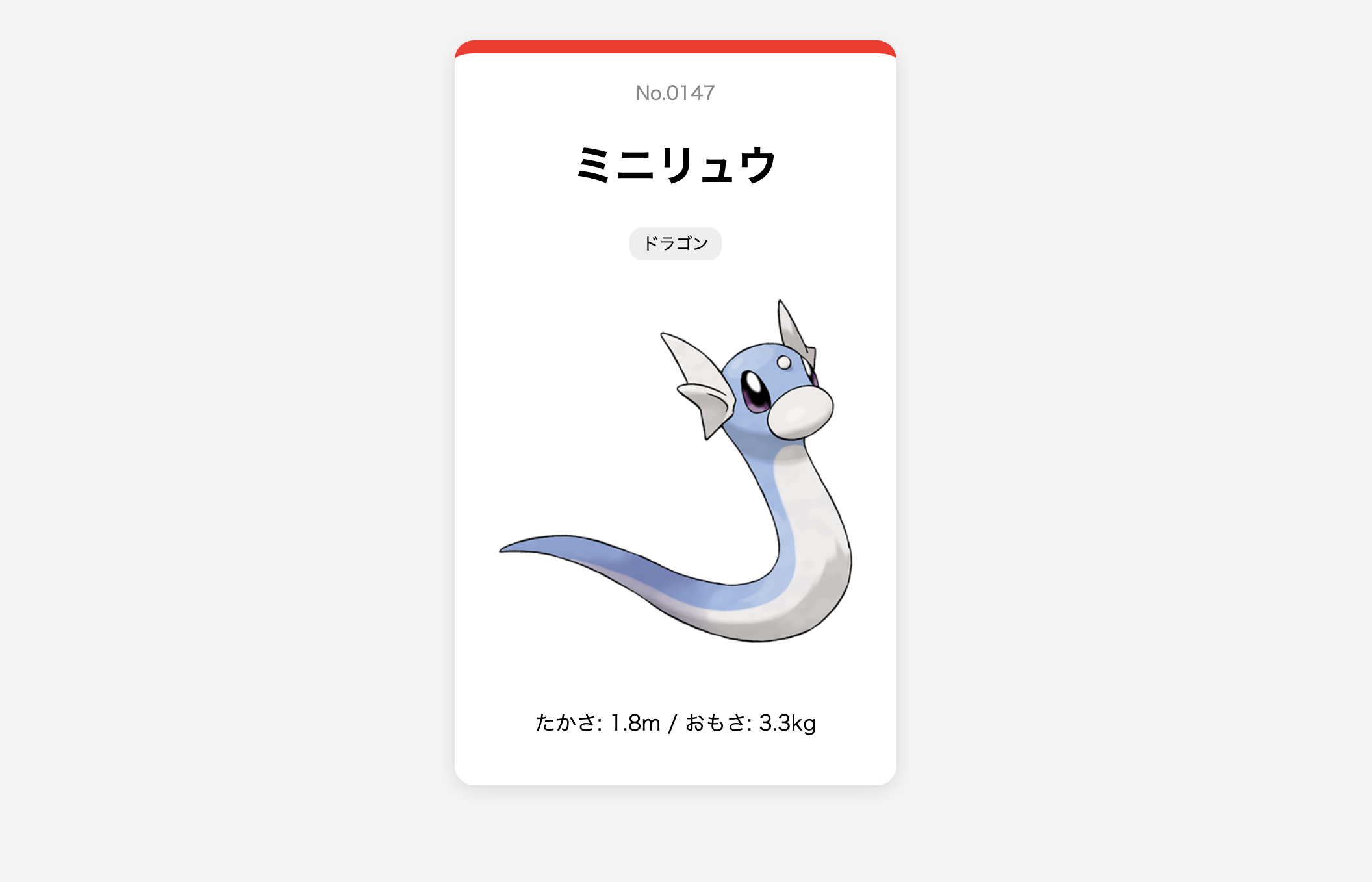
とある投稿で、PokeAPIというサービスを知りました。ライブラリも色々出てはいるようなのですが、シンプルなAPIなので、Rubyの標準ライブラリだけでランダムなポケモンの情報を取得してみました。日本語名を得るためのJSONの掘り下げは複雑ですが、こういうのはAI(今回はGemini使用)が得意ですね。
実行すると、ランダムなIDのHTMLファイルと画像が生成されます。HTMLをブラウザで開くと、ポケモンの情報がカード形式で表示されます。画像は(ドット絵ではなく)公式イラストをキャッシュしています。
require 'net/http'
require 'json'
require 'uri'
require 'open-uri' # 画像保存用

# APIや画像を取得するヘルパー
def get_data(url)
  response = Net::HTTP.get_response(URI.parse(url))
  response.is_a?(Net::HTTPSuccess) ? response.body : nil
end

# 日本語名を探すヘルパー
def find_japanese(names)
  target = names.find { |n| n.dig('language', 'name') == 'ja-Hrkt' } ||
           names.find { |n| n.dig('language', 'name') == 'ja' }
  target ? target['name'] : "???"
end

def collect_pokemon
  puts "🔍 ポケモンを探しています..."
  random_id = rand(1..1025)
  formatted_id = sprintf("%04d", random_id) # 4桁のID(0001など)

  # 1. APIからデータ取得
  poke_json = get_data("https://pokeapi.co/api/v2/pokemon/#{random_id}")
  return puts "失敗しました" unless poke_json
  poke_data = JSON.parse(poke_json)
  safe_name = poke_data['name'].downcase.gsub(/[^a-z0-9]+/, '-')

  species_json = get_data(poke_data.dig('species', 'url'))
  species_data = JSON.parse(species_json)
  jp_name = find_japanese(species_data['names'])

  # 2. 画像の保存 (公式イラスト)
  img_url = poke_data.dig('sprites', 'other', 'official-artwork', 'front_default')
  extension = File.extname(URI.parse(img_url).path) # .png などを取得
  img_filename = "#{formatted_id}-#{safe_name}#{extension}"

  puts "📸 画像を保存中: #{img_filename}"
  File.open(img_filename, 'wb') do |file|
    file.write(get_data(img_url))
  end

  # 3. 日本語タイプの取得
  jp_types = poke_data['types'].map do |t|
    type_data = JSON.parse(get_data(t.dig('type', 'url')))
    find_japanese(type_data['names'])
  end

  # 4. HTMLの生成
  html_filename = "#{formatted_id}-#{safe_name}.html"
  html_content = <<~HTML
    <!DOCTYPE html>
    <html lang="ja">
    <head>
      <meta charset="UTF-8">
      <title>No.#{formatted_id} #{jp_name}</title>
      <style>
        body { font-family: sans-serif; background: #f4f4f4; display: flex; justify-content: center; padding: 50px; }
        .card { background: white; border-radius: 15px; box-shadow: 0 4px 15px rgba(0,0,0,0.1); width: 300px; padding: 20px; text-align: center; border-top: 10px solid #ff1f1f; }
        .id { color: #888; font-size: 0.9em; }
        img { width: 100%; height: auto; margin: 10px 0; }
        .type { background: #eee; padding: 3px 10px; border-radius: 10px; font-size: 0.8em; margin: 2px; display: inline-block; }
      </style>
    </head>
    <body>
      <div class="card">
        <div class="id">No.#{formatted_id}</div>
        <h1>#{jp_name}</h1>
        <div>#{jp_types.map{|t| "<span class='type'>#{t}</span>"}.join}</div>
        <img src="#{img_filename}" alt="#{jp_name}">
        <p>たかさ: #{poke_data['height'].to_f / 10}m / おもさ: #{poke_data['weight'].to_f / 10}kg</p>
      </div>
    </body>
    </html>
  HTML

  File.write(html_filename, html_content)

  puts "✨ 保存完了!"
  puts "📄 HTML: #{html_filename}"
  puts "🖼  IMAGE: #{img_filename}"
end

collect_pokemon
以下はおまけで、生成されたHTMLファイルを一覧表示するダッシュボードです。これもRubyの標準ライブラリだけで完結させています。
def generate_dashboard
  puts "🗂  図鑑ダッシュボードを生成中..."

  # 現在のディレクトリから HTML ファイルを取得(index.html 自体は除く)
  html_files = Dir.glob("*.html").select { |f| f =~ /^\d{4}-/ }.sort

  items_html = html_files.map do |file|
    # ファイル名から ID と 英語名を取得 (例: 0025-pikachu.html)
    id_name = file.sub(".html", "")

    # 簡易的に、対応する画像ファイルを探す (png か jpg)
    img_file = Dir.glob("#{id_name}.{png,jpg,jpeg,svg}").first

    <<~HTML
      <a href="#{file}" class="pokedex-item">
        <div class="id-badge">#{id_name.split('-')[0]}</div>
        <img src="#{img_file}" alt="#{id_name}">
        <div class="name">#{id_name.split('-', 2)[1].capitalize}</div>
      </a>
    HTML
  end.join("\n")

  index_content = <<~HTML
    <!DOCTYPE html>
    <html lang="ja">
    <head>
      <meta charset="UTF-8">
      <title>マイ・ポケモン図鑑 コレクション</title>
      <style>
        body { font-family: sans-serif; background: #2c3e50; color: white; padding: 40px; }
        h1 { text-align: center; font-size: 2.5em; margin-bottom: 40px; }
        .grid { display: grid; grid-template-columns: repeat(auto-fill, minmax(180px, 1fr)); gap: 20px; }
        .pokedex-item {
          background: #ecf0f1; border-radius: 15px; padding: 15px; text-align: center;
          text-decoration: none; color: #333; transition: transform 0.2s; position: relative;
        }
        .pokedex-item:hover { transform: translateY(-5px); box-shadow: 0 5px 15px rgba(0,0,0,0.3); }
        .id-badge { position: absolute; top: 10px; left: 10px; background: #e74c3c; color: white; padding: 2px 8px; border-radius: 10px; font-size: 0.8em; font-weight: bold; }
        img { width: 120px; height: 120px; object-fit: contain; }
        .name { margin-top: 10px; font-weight: bold; text-transform: capitalize; }
      </style>
    </head>
    <body>
      <h1>My Pokémon Collection</h1>
      <div class="grid">
        #{items_html}
      </div>
    </body>
    </html>
  HTML

  File.write("index.html", index_content)
  puts "✅ index.html を作成しました!ブラウザで確認してください。"
end

generate_dashboard